- Work efficiently: no more switching between Isabel 6 and your business software.
- Save time: eliminate repetitive tasks with automated CODA file imports and software-integrated payments.
- Enhance security: reduce manual work to avoid errors caused by incorrect or incomplete file uploads and downloads. Your processes stay safe and reliable.
- Gain visibility: access up-to-date account balances and financial insights directly in your software.





Adfinity - easi

Connect Isabel 6 with Adfinity, efficiently and securely
Already using Adfinity by easi for your accounting or business workflows? Go further by connecting Isabel 6 to your software, thanks to Isabel Connect. Automate your banking: retrieve bank statements directly in Adfinity and send payments from within your software, ready to be signed in Isabel 6.
How to get started?
Step 1: Contact your easi consultant
Your consultant will help activate Isabel Connect for Adfinity.
Step 2: Setup and activation
Easi will take on the technical setup. As part of this process, you will have to log into your Isabel 6 environment and activate the Isabel Connect module.
Step 3: You're ready
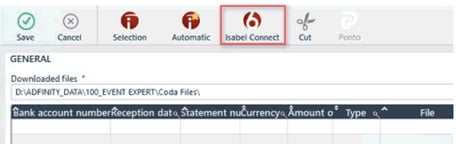
A new Isabel Connect button appears in your Adfinity interface.
Adsolut - Wolters Kluwer

Connect Isabel 6 with Adsolut, and initiate payments from your software
Using Isabel 6 for your banking and working in Adsolut to run your business? Connect them in three simple steps and streamline how you send payment orders. No IT support needed. Just a few clicks, and you’re connected. Simple as that.
How to get started?
Step 1: Activate the free 'Adsolut Payment Orders' application
Make sure you’re using Adsolut version 1.57 or higher. Log in to My.Adsolut.com as an admin, find the Adsolut Payment Orders tile, and click Activate.
Step 2: Connect to Isabel 6
Open the Adsolut Payment Orders application and click Connect to Isabel. You’ll be guided through the connection.
Step 3: Start sending payments
Select your file, send your payment files from Adsolut, and sign them in Isabel 6. You’ll find status updates and history in your Adsolut software so you can track everything from one place.
KPD Finance - KPD

Banking, built into your KPD Finance environment
Link Isabel 6 directly to your KPD software and automate your bank statement processing and payments. Smooth, secure, and fully integrated within your trusted software.
How to get started?
Step 1: Subscribe to Isabel Connect
Contact Isabel to subscribe to the Isabel Connect module. Once confirmed, you’ll receive a connection number.
Step 2: Share your connection number with KPD
Provide your connection number to your KPD consultant. The KPD team will handle the activation and technical setup of the Isabel APIs.
Step 3: Activate in your KPD Finance environment
In BO-Finance, perform a one-time setup via Isabel User Linking.
Once linked, you work even more efficiently:
- CODA files are uploaded automatically each morning from Isabel 6.
- Send payment files straight from KPD to Isabel 6 using the Isabel Connect button at the top of your payment lists screen.
OptiPro - Orisha | Sogis

Three simple steps to connect Isabel 6 with OptiPro
Working in OptiPro for your property management? With Isabel Connect, you easily bring Isabel 6’s multibanking features directly into your software. No development needed, just three easy steps.
How to get started?
Step 1: Activate Isabel Connect in OptiPro
In your OptiPro software, go to Configuration and select Isabel Connect.
Create your Isabel Connect account by by naming it, selecting the relevant office, and choosing your preferred language.
Step 2: Connect to Isabel 6
You’ll be automatically redirected to Isabel 6. Choose your authentication method and log in. Next, you’ll see confirmation of the Isabel Connect link for your account. Return to OptiPro, refresh the page, and the connection is ready.
Step 3: Automate your banking
Once connected, link your bank accounts to the correct property or office. Then enjoy the benefits:
- An overview of your linked accounts, balances, and transaction history.
- Automated CODA imports, after a one-time setup.
- Payments initiated directly in OptiPro, send them to Isabel 6 and sign according to your validation flows.
Profit - AFAS

Bring banking into your Profit software in 3 simple steps
Using Profit by AFAS? Good news, the Isabel Connect integration is already built in. You just need to activate it. Once that’s done, your CAMT53 bank statements flow directly into Profit, and you can initiate payments directly from your software. Validate them (in bulk) by signing in Isabel 6. Efficient, secure and effortless.
How to get started?
Step 1: Open the communication settings in Profit
Go to: General > Communication service > Communication profile.
Find Communication with Isabel Connect and go to its settings.
Step 2: Activate Isabel Connect
Click on Actions > Activate Isabel Connect and follow the wizard.
You’ll be guided to the BIS portal (Bank Integration Service) to complete the connection.
Step 3: Finalise in Isabel 6
Log in via Isabel 6 and activate the Isabel Connect module to confirm the integration.